Adding channels
Find a broadcaster's channel on its platform by name, URL, or ID, add it to Streaminz, and start monitoring it in one step.
When Streaminz doesn’t have a broadcaster’s channel yet, find it on its platform. Streaminz adds the channel and starts monitoring it for you.
Find a channel
- Select Find channel in the top bar. Or search for the channel and select Add it under Can’t find the channel you want?
- Identify the channel in the Find a channel dialog:
- Search: pick the platform to search, enter a channel name or ID, and select Search. Streaminz searches one platform at a time. Pick the channel from the results.
- URL: paste the channel’s address, like
https://www.twitch.tv/name, and select Find channel. - ID: pick the platform, enter the channel ID, and select Find channel.
- Streaminz opens the channel page.
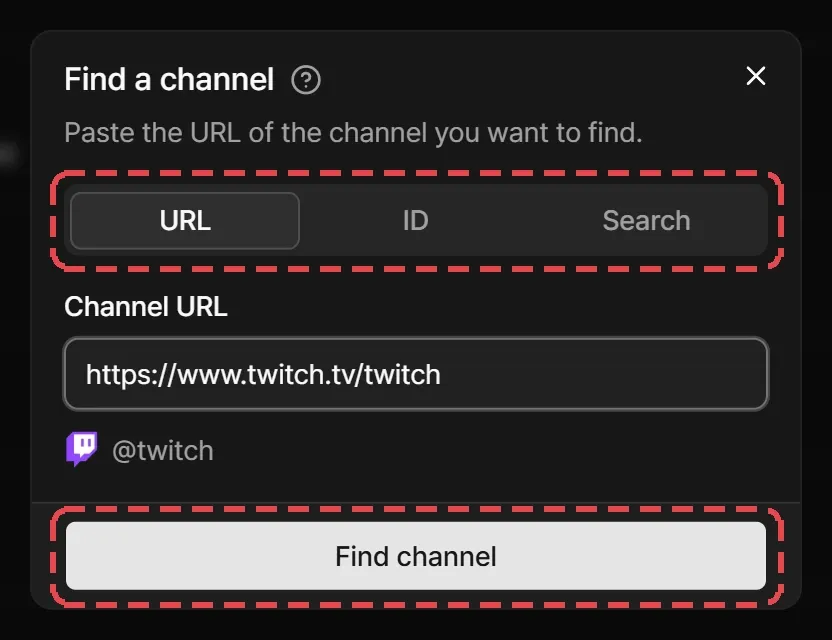
Streaminz looks the channel up on the platform. If it comes back empty, check the name, URL, or ID and try again. When a platform can’t be searched right now, use a URL or ID instead.
Monitoring starts right away
Finding a channel starts monitoring it for you, with new video notifications on, whether you just added it or Streaminz already had it. This needs a plan with a free slot. Without a plan or a free slot, Streaminz still opens the channel page, and you can select Start monitoring there once you have room.
Supported URLs
| Platform | Channel URL format |
|---|---|
| Twitch | twitch.tv/<id> |
| SOOP | sooplive.com/station/<id> or sooplive.co.kr/station/<id> |
| CHZZK | chzzk.naver.com/<id> |
| PandaLive | pandalive.co.kr/channel/<id> |
| Chaturbate | chaturbate.com/<id> |
| Stripchat | stripchat.com/<id> |
SOOP live links like play.sooplive.com/<id> work too. See Supported platforms.
Things to know
- You need to sign in to find a channel.
- Recording starts with the channel’s next live broadcast. Streaminz has nothing from before the channel was monitored.
- Adding a channel doesn’t make it yours or give you rights in its content.
- Some channels can’t be added, because the broadcaster asked us to stop archiving them. Broadcasters can make that request with Form SZ-102. See Removal requests.